The API
14 min read · By Stefan Köhn
Records arrive from outside through the intake API: from a form on your website, from an ad account, from another system. It is open in every account, even without a booked module, because a record belongs to the core of the application and not to an add-on.
Open, even without a booked module
If all you want is to collect records and get them back out, you get the same endpoint as somebody running every module. What a module contributes, on the other hand, only shows up in the documentation once you have booked it. An endpoint that reliably answers 403 is not information, it is an invitation to go looking.
Two ways in
The API key belongs to the account and can do whatever its permissions allow. The source token belongs to exactly one source and may do exactly one thing: create records. From outside the two look alike, a string somebody knocks with. The difference still decides whether a connection works at all, because an ad account that cannot set a header will never get in with a key.
The documentation shows your fields
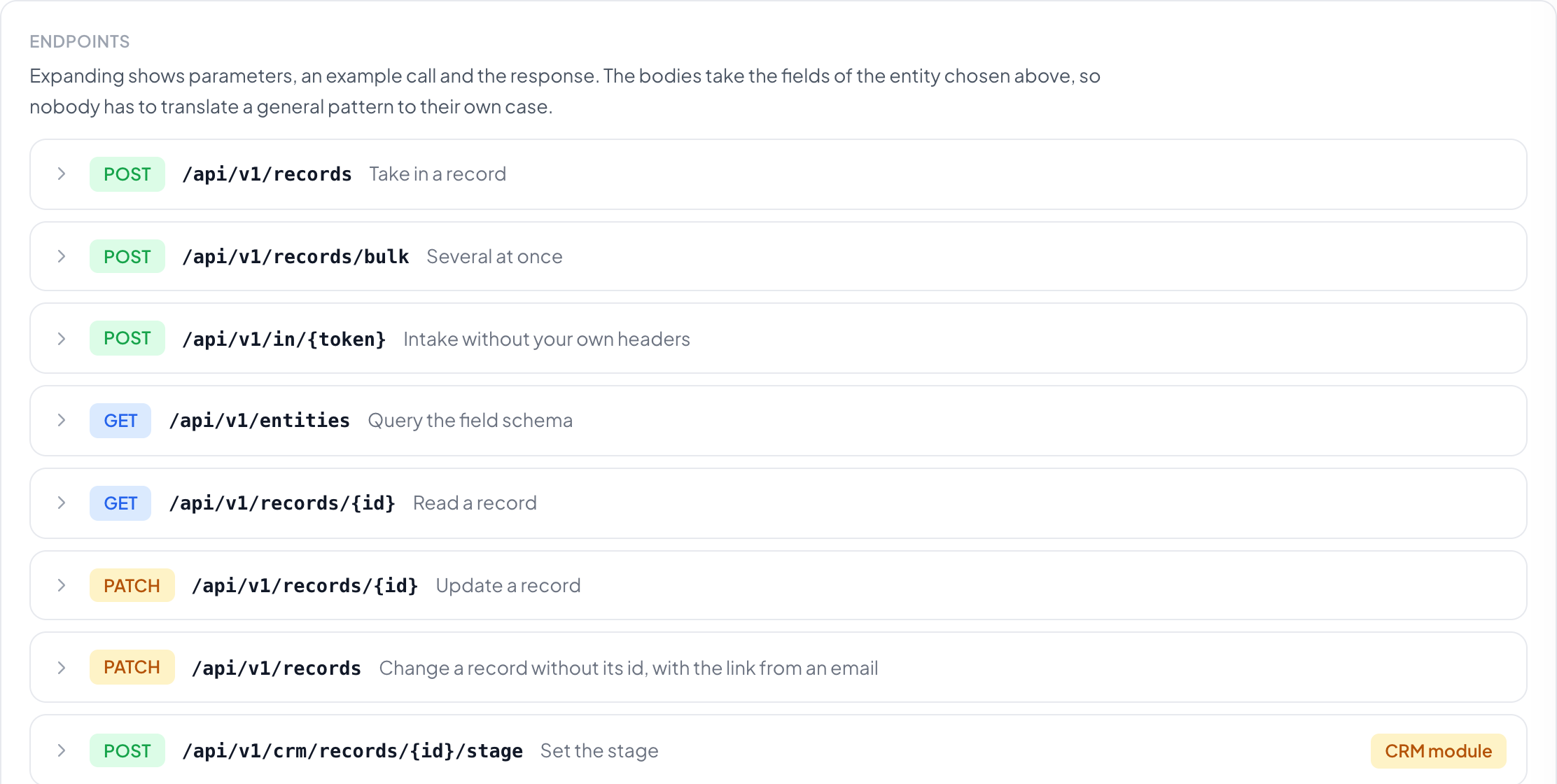
Under Documentation the endpoints expand one by one, each with parameters, an example call and the response. The example body is built from the fields of the entity you pick above, and the responses are the shapes the platform actually returns. General documentation would have to be translated to your case first, and that translation is where the errors come from that later get reported as a broken API.
Nested or flat
Both spellings are accepted. Nested is the clean form, with the values grouped under one key. Flat is for sources that cannot do objects, an ad account with a fixed form layout for instance. The switch above the endpoints converts every example, content type in the call included.
When the same handover arrives twice
Three nets catch it. An idempotency key per handover returns the same answer the second time instead of a second record. An external id sent along is the sender promising this is the same lead, and it beats every other rule. And the entity itself defines what it treats as a duplicate and what happens then.
Notes on existing records
Another system can attach a note to a record that already exists: a phone system the call, a chat tool the conversation. The record is given by its ID or by email address. A new record is never created. If none matches, the note is rejected, and if two match, it is rejected as well, with both IDs in the response so the system can follow up precisely. This needs an API key, a source token will not do. Notes cannot be read through the API.
Unknown fields are accepted
Whatever the entity does not know is set aside and reported as a warning in the response. Rejecting a handover over one extra field costs a real record, and that is the more expensive mistake. If you want it the other way round, turn on strict mode on the key; the same handover is then refused instead of quietly losing value.
Step by step
- Open Settings, API. The area starts with the documentation.
- Pick the entity you are working with at the top. Every example below follows.
- Create an access: a key for a system that can set headers, otherwise a source token.
- Send the example call, or press Create test record on the first endpoint. It takes the same path as a real one and lands on the board.
- Check the log to see whether it arrived, and with what result.
What is the difference between an API key and a source token?
The key belongs to the account and can do whatever its permissions allow. A source token belongs to exactly one source and may do exactly one thing: create records.
Which of the two do I need?
If the other system can set a header, take the key. If all it offers is a field for an address, take the source token. That is what decides, not the size of the integration.
Nested or flat?
Both are accepted. Nested is the clean form, flat is for sources that cannot do objects. The result is identical.
What happens to unknown fields?
They are accepted and set aside, not refused, and the response names them as warnings. Turning down a handover over one extra field costs a real record.
How do I avoid duplicate records?
With an idempotency key per handover. If the same handover arrives twice, the second time you get the same answer instead of a second record. That holds even while the first is still running: the second waits for its answer.
Can I send files along?
Yes, as an address rather than an attachment. The platform fetches the file and attaches it to the record, either to a named file field or to the record's document store.
Can another system add notes?
Yes, with an API key through the “Add a note” endpoint, by record ID or by email address. The history shows the API as the sender, and an @ in the text mentions nobody.
Endpoint reference
Every endpoint the platform answers, with its parameters, an example request and the shape of the answer. This list comes out of the application itself, so it cannot be shorter than the interface and it cannot name a call that does not exist.
The examples below use a made-up entity called lead with two fields, one pipeline and one file field. Signed in, the same reference sits under Settings, API and builds its examples from your own entities, fields and pipelines instead. There the rows are collapsed and a switch turns every example into the flat spelling; here everything stands open and nested.
The same reference as one Markdown file — no navigation around it, for pasting into a tool or an AI session.
Core
POST/api/v1/records
Take in a record
The main way in. It belongs to the core and stays open even when no module is booked. A module node in the payload is then ignored and reported rather than rejecting the whole request.
Authentication: Bearer <API key>
| Key | Required | Meaning |
|---|---|---|
entity | Yes | Key of the entity, e.g. lead |
fields | Yes | The values, under their field keys |
note | Optional | An internal note on the record, prose for a human. For answers that have no field: what the funnel asks per branch, the backstory before the first call. |
documents | Optional | URLs the platform fetches. With “field” the file lands on that field, without it in the record’s document pool. |
crm | Optional | Pipeline and stage the record is put into |
booking | Optional | With the booking module: creates a booking link for this record and returns it under “booking” (token, url, expires_at). Optional “title” and “duration_minutes” for the invitation. No email is sent. With the token, a Leadflip form with the “Pick a time” block books for this record: <div data-lf-form="FORM" data-lf-booking-token="TOKEN">; title and duration then come from the block. With “starts_at” (ISO timestamp of a free slot) the time is booked right away, and “booking” carries appointment_id and starts_at. If the slot has been taken or is not on offer, you get the booking link as without “starts_at”, plus the warning slot_taken; an unreadable time reports invalid_starts_at. The record is created either way. |
meta | Optional | Statements about the submission, not about the person: source, external id, idempotency key, and the origin: utm_source, utm_medium, utm_campaign, utm_content, utm_term, gclid, fbclid, referrer. Origin belongs here, not at the top level: up there every name is a field name, so a top-level “utm_source” looks for a field by that name and otherwise ends up as an unknown field. |
{
  "entity": "lead",
  "fields": {
    "last_name": "Reimer",
    "email": "anke@example.de"
  },
  "documents": [
    {
      "url": "https://example.de/attachment.pdf",
      "name": "Attachment.pdf",
      "field": "attachment"
    }
  ],
  "crm": {
    "stage": "New"
  },
  "meta": {
    "source": "google-ads",
    "idempotency_key": "unique-per-submission",
    "utm_source": "google",
    "utm_medium": "cpc",
    "utm_campaign": "spring",
    "gclid": "Cj0KCQ…"
  }
}{
"id": "8f21c4a3-…",
"entity": "lead",
"created": true,
"updated": false,
"warnings": []
}POST/api/v1/records/bulk
Several at once
Up to 100 records in one call. The response is a list of individual responses, not a summary: with fifty leads, “which three had unknown fields” is the answer you need. A failed entry does not hold up the rest.
Authentication: Bearer <API key>
| Key | Required | Meaning |
|---|---|---|
records | Yes | The list of payloads, each shaped like /records |
{
"records": [
"…",
"…"
]
}{
"accepted": 2,
"rejected": 1,
"results": [
{
  "id": "8f21c4a3-…",
  "entity": "lead",
  "created": true,
  "updated": false,
  "warnings": []
},
{
"error": "unknown_entity"
}
]
}POST/api/v1/in/{token}
Intake without your own headers
For sources that cannot set an Authorization header: lead forms from Google and Meta, plain HTML forms. Same handler, same rules; the credential sits in the path and can be revoked on its own.
Authentication: Source token in the path
| Key | Required | Meaning |
|---|---|---|
token | Yes | The token from the “Sources” list, one per source |
{
  "entity": "lead",
  "fields": {
    "last_name": "Reimer",
    "email": "anke@example.de"
  },
  "documents": [
    {
      "url": "https://example.de/attachment.pdf",
      "name": "Attachment.pdf",
      "field": "attachment"
    }
  ],
  "crm": {
    "stage": "New"
  },
  "meta": {
    "source": "google-ads",
    "idempotency_key": "unique-per-submission",
    "utm_source": "google",
    "utm_medium": "cpc",
    "utm_campaign": "spring",
    "gclid": "Cj0KCQ…"
  }
}{
"id": "8f21c4a3-…",
"entity": "lead",
"created": true,
"updated": false,
"warnings": [
{
"key": "gclid_extra",
"reason": "unmapped"
}
]
}GET/api/v1/entities
Query the field schema
Which entities exist and which fields with which types: the basis of any integration. Select fields ship their allowed values; without them a producer sends “Bavaria” where “BY” is expected and finds out in the 422.
Authentication: Bearer <API key>
{
  "entities": [
    {
      "key": "lead",
      "name": "Lead",
      "archived": false,
      "fields": [
        {
          "key": "last_name",
          "label": "Last name",
          "type": "text",
          "format": null,
          "required": true
        }
      ]
    }
  ],
  "modules": [
    "crm"
  ]
}GET/api/v1/records/{id}
Read a record
Fields, documents and origin of the record. Documents come back as an address, not as content.
Authentication: Bearer <API key>
{
  "id": "8f21c4a3-…",
  "entity": "lead",
  "name": "Reimer",
  "fields": {
    "last_name": "Reimer",
    "email": "anke@example.de"
  },
  "source": "google-ads",
  "documents": [
    {
      "id": "…",
      "name": "Attachment.pdf",
      "mime": "application/pdf",
      "size": 184320,
      "field": "attachment",
      "url": "/api/v1/documents/…"
    }
  ],
  "created_at": "2026-09-02T08:14:00.000Z",
  "updated_at": "2026-09-02T09:01:00.000Z",
  "crm": {
    "pipeline": "Sales",
    "stage": "New"
  }
}PATCH/api/v1/records/{id}
Update a record
Sets fields and attaches documents. Fields you do not name stay untouched: a PATCH is not a replacement. Documents arrive as URLs the platform fetches; the same path as intake. Without “field” the file goes to the record’s document pool.
Authentication: Bearer <API key>
| Key | Required | Meaning |
|---|---|---|
fields | Optional | Only the fields that should change |
documents | Optional | URLs to fetch. With “field” the file lands on that field, without it in the record’s document pool. |
{
  "fields": {
    "last_name": "Reimer"
  },
  "documents": [
    {
      "url": "https://example.de/attachment.pdf",
      "field": "attachment"
    },
    {
      "url": "https://example.de/unsorted.pdf"
    }
  ]
}{
"id": "8f21c4a3-…",
"entity": "lead",
"updated": true,
"fields": [
"last_name"
],
"documents": 1,
"warnings": []
}PATCH/api/v1/records
Change a record without its id, with the link from an email
Same operation, different door: instead of an API key, a record token identifies the caller. It names the record itself, so no id in the path, and it names the fields it opens. Anything outside is reported, not written: a forwarded email may supply a document but not change an amount. The token comes from the system.fall_token variable in an automation email.
Authentication: Bearer <record token>
| Key | Required | Meaning |
|---|---|---|
fields | Optional | Only fields the token opens |
documents | Optional | URLs to fetch. “field” is only needed when the token opens several file fields. A record link cannot use the pool. |
{
  "fields": {
    "last_name": "Reimer"
  },
  "documents": [
    {
      "url": "https://example.de/attachment.pdf"
    }
  ]
}{
"id": "8f21c4a3-…",
"entity": "lead",
"updated": true,
"fields": [
"last_name"
],
"documents": 1,
"warnings": [
{
"key": "email",
"reason": "not_in_scope"
}
]
}POST/api/v1/notes
Add a note
Attaches a note to a record that already exists, by its ID or by email address. A new record is never created. If none matches you get 404, if several match you get 409 with their IDs. The sender is the API, and @ mentions do not notify anyone. Through the API, notes can only be added, not read.
Authentication: Bearer <API key>
| Key | Required | Meaning |
|---|---|---|
body | Yes | The text of the note |
record | Optional | ID of the record. Either this or “email” |
email | Optional | Email address of the record, looked up in the field with the email role, ignoring case |
entity | Optional | Limits the email lookup to this entity |
kind | Optional | “general” (default), “call” or “email” |
idempotency_key | Optional | The same key never adds a second note. Also accepted as the Idempotency-Key header |
{
  "email": "jane.doe@example.com",
  "entity": "lead",
  "kind": "call",
  "body": "Called back, wants an offer by Friday"
}{
"id": "c0a8e1d2-…",
"record_id": "8f21c4a3-…",
"kind": "call",
"created_at": "2026-10-05T09:30:00.000Z",
"warnings": []
}GET/api/v1/documents/{id}
Fetch a document
The other side of an address in a record: reading a record names its documents, here the file itself comes back. The answer is therefore the file and not JSON. A service that analyses a file does not get an attachment from us, it gets an address that expires and fetches the file itself, so the analysis does not hang on the time budget of an automation run.
Authentication: Bearer <API key>, or the signature in the address
| Key | Required | Meaning |
|---|---|---|
exp | Optional | End of the validity, part of the signed address |
sig | Optional | The signature. Together with exp it replaces the key, and it is the narrower permission: valid for this one document and for thirty minutes, while a key is valid for the whole account and without end. |
200 OK
Content-Type: application/pdf
Content-Disposition: attachment; filename="Attachment.pdf"
Content-Security-Policy: sandbox
Cache-Control: no-store, private
CRM module
POST/api/v1/crm/records/{id}/stage
Set the stage
Moves a record on, through the same path as dragging a card. Time in stage, history and the automations of the target stage follow by themselves.
Authentication: Bearer <API key>
| Key | Required | Meaning |
|---|---|---|
stage | Yes | Name of the target stage |
pipeline | Optional | Only needed when the entity has more than one pipeline |
{
  "pipeline": "Sales",
  "stage": "In review"
}{
"id": "8f21c4a3-…",
"crm": {
"pipeline": "Sales",
"stage": "In review"
},
"previous": "New"
}GET/api/v1/crm/pipelines
Query pipelines and stages
Which names are valid when setting a stage. Hard-coding them breaks on the first rename.
Authentication: Bearer <API key>
{
  "entities": [
    {
      "key": "lead",
      "pipelines": [
        {
          "name": "Sales",
          "stages": [
            "New",
            "In review"
          ]
        }
      ]
    }
  ]
}
Distribution module
GET/api/v1/distribution/partners
List partners
The master data, without the retired ones: a retired partner stays in the records and is out of every selection. Each entry carries gaps, the statements an invoice is still missing at this partner, named one by one. A system that maintains partners should not learn at the billing run that an address was incomplete.
Authentication: Bearer <API key>
| Key | Required | Meaning |
|---|---|---|
q | Optional | Search term over name, contact, mail address and city |
{
  "partner": [
    {
      "id": "3f7c9e21-…",
      "name": "Solarwerk Nord",
      "contact_person": "Anke Reimer",
      "email": "einkauf@example.de",
      "phone": "+49 30 1234560",
      "street": "Hafenstrasse 12",
      "postal_code": "20359",
      "city": "Hamburg",
      "country": "DE",
      "vat_id": "DE123456789",
      "billing_address_differs": false,
      "billing_name": null,
      "billing_street": null,
      "billing_postal_code": null,
      "billing_city": null,
      "billing_country": null,
      "billing_email": null,
      "buyer_reference": "PO-4711",
      "portal_right_contact": "view",
      "portal_right_billing": "view",
      "retired": false,
      "gaps": []
    }
  ]
}POST/api/v1/distribution/partners
Create a partner
Only the name is required, everything else can follow later. What is missing before an invoice can be written stands in gaps of the answer when the partner is read. A name that already exists is refused: a partner is identified by name, and two of the same name would turn every assignment into a guess. The keys are snake_case; the earlier camelCase spelling is still accepted when writing.
Authentication: Bearer <API key>
| Key | Required | Meaning |
|---|---|---|
name | Yes | The name. It identifies the partner, so a name that already exists is refused. |
contact_person | Optional | Who is addressed at this partner |
email | Optional | Where deliveries and invoices go by mail |
phone | Optional | Phone number, plain text |
street | Optional | Street and number of the address an invoice needs |
postal_code | Optional | Postal code of that address |
city | Optional | City of that address |
country | Optional | Country, as a two letter code or as a name. A name is resolved, an unknown one is refused. |
vat_id | Optional | VAT id. Spaces are removed and letters are upper cased. |
billing_address_differs | Optional | Bill to a different address than the one above |
billing_name | Optional | Name on the invoice, only used when the billing address differs |
billing_street | Optional | Street of the billing address |
billing_postal_code | Optional | Postal code of the billing address |
billing_city | Optional | City of the billing address |
billing_country | Optional | Country of the billing address |
billing_email | Optional | Where invoices go, when that is not the address above |
buyer_reference | Optional | The buyer reference, required for an electronic invoice and free otherwise |
{
  "name": "Solarwerk Nord",
  "contact_person": "Anke Reimer",
  "email": "einkauf@example.de",
  "phone": "+49 30 1234560",
  "street": "Hafenstrasse 12",
  "postal_code": "20359",
  "city": "Hamburg",
  "country": "DE",
  "vat_id": "DE123456789",
  "billing_address_differs": false,
  "buyer_reference": "PO-4711"
}{
"id": "3f7c9e21-…"
}GET/api/v1/distribution/partners/{id}
Read one partner
One partner with everything about him: the address, the billing address, the rights his contacts have in the portal, and the gaps an invoice is still missing. The list of all partners answers in the same shape.
Authentication: Bearer <API key>
{
  "id": "3f7c9e21-…",
  "name": "Solarwerk Nord",
  "contact_person": "Anke Reimer",
  "email": "einkauf@example.de",
  "phone": "+49 30 1234560",
  "street": "Hafenstrasse 12",
  "postal_code": "20359",
  "city": "Hamburg",
  "country": "DE",
  "vat_id": "DE123456789",
  "billing_address_differs": false,
  "billing_name": null,
  "billing_street": null,
  "billing_postal_code": null,
  "billing_city": null,
  "billing_country": null,
  "billing_email": null,
  "buyer_reference": "PO-4711",
  "portal_right_contact": "view",
  "portal_right_billing": "view",
  "retired": false,
  "gaps": []
}PATCH/api/v1/distribution/partners/{id}
Change a partner
Only what was sent: a missing field means unchanged, not emptied. A system that adds nothing but the VAT id should not lose the address on the way. Switching off the separate billing address leaves its fields in place, for the same reason.
Authentication: Bearer <API key>
| Key | Required | Meaning |
|---|---|---|
name | Optional | The name. It identifies the partner, so a name that already exists is refused. |
contact_person | Optional | Who is addressed at this partner |
email | Optional | Where deliveries and invoices go by mail |
phone | Optional | Phone number, plain text |
street | Optional | Street and number of the address an invoice needs |
postal_code | Optional | Postal code of that address |
city | Optional | City of that address |
country | Optional | Country, as a two letter code or as a name. A name is resolved, an unknown one is refused. |
vat_id | Optional | VAT id. Spaces are removed and letters are upper cased. |
billing_address_differs | Optional | Bill to a different address than the one above |
billing_name | Optional | Name on the invoice, only used when the billing address differs |
billing_street | Optional | Street of the billing address |
billing_postal_code | Optional | Postal code of the billing address |
billing_city | Optional | City of the billing address |
billing_country | Optional | Country of the billing address |
billing_email | Optional | Where invoices go, when that is not the address above |
buyer_reference | Optional | The buyer reference, required for an electronic invoice and free otherwise |
{
  "vat_id": "DE123456789"
}{
"id": "3f7c9e21-…"
}POST/api/v1/distribution/distributions
Distribute an existing record
The way in for a system that does not use the CRM and has created the record already. Whoever wants both in one call uses the distribution node of the intake instead. It is the same entry point as the automation and the button on the record, because three ways with three sequences would be three places to forget a limit. Is no distribution set up for this kind of record, the answer is 404: that is information and not a fault.
Authentication: Bearer <API key>
| Key | Required | Meaning |
|---|---|---|
record_id | Yes | The record that is to be distributed |
{
  "record_id": "8f21c4a3-…"
}{
"status": "distributed",
"reason": null,
"partner_count": 2,
"partner_names": "Solarwerk Nord und Dachprofi Mitte",
"partner": [
{
"name": "Solarwerk Nord",
"email": "einkauf@example.de",
"phone": "+49 30 1234560",
"city": "Hamburg",
"price_cents": 4500,
"channel": "webhook",
"status": "delivered"
}
],
"price_total": 9000,
"run_id": "b12e7d40-…"
}GET/api/v1/distribution/distributions/{id}
Read a distribution
The state after starting: who got the record, at what price, and whether it arrived. The price is part of the answer because it is written down at that moment and does not change afterwards.
Authentication: Bearer <API key>
{
  "id": "b12e7d40-…",
  "status": "decided",
  "record_id": "8f21c4a3-…",
  "triggered_by": "api",
  "started_at": "2026-09-02T08:14:00.000Z",
  "finished_at": "2026-09-02T08:14:03.000Z",
  "deliveries": [
    {
      "id": "c5a1…",
      "status": "delivered",
      "partner": "Solarwerk Nord",
      "price_cents": 4500,
      "currency": "EUR",
      "attempts": 1,
      "delivered_at": "2026-09-02T08:14:03.000Z"
    }
  ]
}GET/api/v1/distribution/deliveries
List deliveries
The same filters as the list on screen. Two sets of filters over the same rows would be two chances for one to return what the other does not, and why the API shows more than the screen is not a question you want to answer.
Authentication: Bearer <API key>
| Key | Required | Meaning |
|---|---|---|
status | Optional | One delivery state, for example delivered or failed |
partner_id | Optional | Only the deliveries of this partner |
from | Optional | Only from this point in time, as a date or a timestamp |
to | Optional | Only up to this point in time |
limit | Optional | How many rows at most. 200 without a value, 500 is the ceiling. |
{
  "deliveries": [
    {
      "id": "c5a1…",
      "status": "delivered",
      "partner": "Solarwerk Nord",
      "rule": "Hamburg, from 40 euro",
      "price_cents": 4500,
      "currency": "EUR",
      "attempts": 1,
      "error": null,
      "created_at": "2026-09-02T08:14:00.000Z",
      "delivered_at": "2026-09-02T08:14:03.000Z",
      "record_id": "8f21c4a3-…"
    }
  ]
}POST/api/v1/distribution/deliveries/{id}/return
Return a delivery
There is exactly one return, what differs is the way in: signed in to the portal, a signed link in the delivery mail, or this address for machines. Within the deadline it takes effect at once, whichever way it arrives. Outside it, or on a delivery that never arrived, the answer says why instead of returning it.
Authentication: Bearer <API key>
| Key | Required | Meaning |
|---|---|---|
reason_id | Optional | One of the return reasons of the account. Without it the return counts, it just does not say what for. |
text | Optional | What happened, in the words of the partner |
reported_by | Optional | Who reported it at the partner |
{
  "reason_id": "7d2f…",
  "text": "Phone number unreachable",
  "reported_by": "einkauf@example.de"
}{
"returned": true,
"redistributed": false
}POST/api/v1/distribution/participations/{id}/test
Send a test delivery
An invented record to the real address, so a new connection can be put into service without spending a real record on it. It writes no delivery row and no invoice item, and it gives request and answer back in plain text so they can be held against what the receiver says. The address belongs to the participation and not to the partner: the same partner can take two distributions at two addresses, and a test to the partner would have to guess which one is meant.
Authentication: Bearer <API key>
{
  "ok": true,
  "channel": "webhook",
  "message": "sent",
  "status": 200,
  "response": "OK",
  "request": {
    "url": "https://example.de/hook",
    "body": "…"
  }
}