The partner list
2 min read · By Stefan Köhn
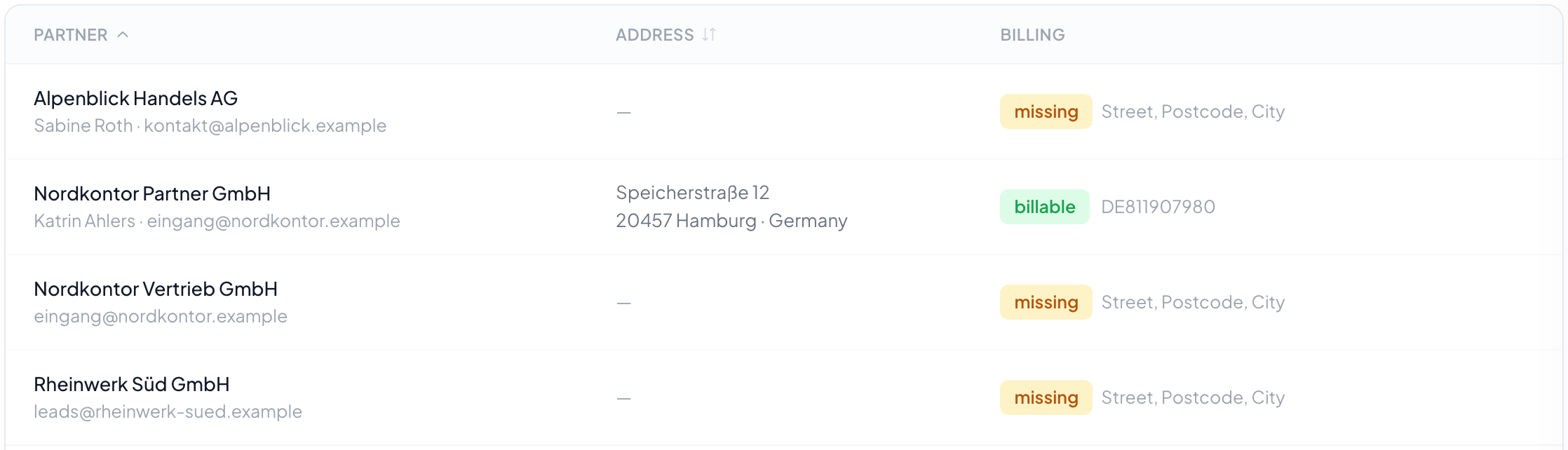
A partner is whoever takes records. Here you keep who they are, where they are based and where the invoice goes: nothing more. How they are supplied and what they receive belongs to the distribution, because it differs per distribution.
Master data only
Who they are, where they sit, where the invoice goes. Nothing more. Everything that differs per distribution sits on the participation and not here.
Why price and delivery address are missing
Because the same partner can have two prices and two addresses in two distributions. If they sat on the master record, the second case would need a second partner, and then invoicing and reporting would run under two names for one firm.
The billing data has a say
Without a complete address no invoice appears, and the row carries the note that billing data is missing. What exactly belongs there is under Partner record.
Retire rather than delete
A retired partner receives nothing further but stays attached to their deliveries and invoices. Deleting only works while nothing hangs off them; otherwise the history would be unreadable afterwards.
Step by step
- Open Partners. The list shows everyone who takes records.
- Create a new partner with their master data.
- Enter the billing data, otherwise no document can be issued later.
- Go to the routing and set up their participation and their rules there.
Why are price and delivery address not here?
Because they differ per distribution. The same buyer takes one record type at a different address than another, often at a different price. Both therefore sit at their participation under "Distribution".
What does the "invoice incomplete" marker mean?
Something is missing that an invoice must carry: the address, the country, an address to send it to. The list names what exactly. As long as something is missing the partner is skipped in the billing run and named, instead of producing an invoice nobody is allowed to send.
What happens when I retire a partner?
They disappear from every selection and receive nothing more, but they stay in the records: with their deliveries and invoices, which have retention periods of their own. The switch above the list brings retired partners back into view.
Can I delete a partner?
Not while documents are attached to them. An invoice without a recipient would no longer be a valid document. Retiring is the right way.