Invoicing

Last updated: 2026-05-13
Sidebar > Distribution > Invoices

Where to find it

Sidebar > Distribution > Invoices

Invoicing

Leadflip generates partner invoices automatically from your distribution data. You don't export delivery logs, you don't reconcile counts against pricing, and you don't build invoices in a separate tool. Pricing lives in the Distribution Profile, deliveries are counted at the moment they happen, and invoices are produced on demand or on schedule.

Distribution invoices list scoped to the current Entity

Where to find it

Sidebar > Distribution > Invoices. The page is scoped to your current Entity.

How an invoice is built

  1. Pricing. Every assignment in a Distribution Profile has a per-lead price (either the profile's base price, or an override set on the assignment). See Routing Rules.
  2. Deliveries. Each successful delivery records a DistributionTransaction carrying the lead's price at that moment.
  3. Invoice period. You pick a billing period (typically a month).
  4. Generation. Leadflip sums all transactions for the period, per partner, and creates one invoice per partner with at least one delivery.
  5. PDF output. The invoice is rendered as a PDF (and, when applicable, as an EU-compliant ZUGFeRD or XRechnung file).

Pricing models

Model How it works When to use it
Flat per-lead Single price for every delivered lead under an assignment. The simplest setup. Same lead quality, same price.
Per-assignment override Different prices in different assignments within the same profile. Premium segments command premium prices; catch-all assignments get a lower price.
Volume tiers (planned) Different prices at volume thresholds (e.g. first 100 leads at $15, next 400 at $12). Reward your largest buyers without renegotiating per-lead pricing.

Set pricing on the Routing page of the Distribution Profile. See Routing Rules.

Generating invoices

  1. Open Distribution > Invoices.
  2. Pick the billing period.
  3. Review the per-partner preview: leads delivered, prices applied, total.
  4. Click Generate. Invoices are created in Draft status.
  5. Review each draft. Make adjustments if needed (e.g. a manual credit for a disputed lead).
  6. Click Finalize. The invoice is assigned a permanent invoice number and the PDF is locked.
  7. Send to the partner (email + portal link) or download the PDF.

EU tax compliance

If you operate in the European Union, Leadflip handles the tax mechanics automatically.

Same-country B2B sales

Invoices include the local VAT rate at the standard rate (or reduced rate if configured on your Entity). The VAT amount is rendered on the invoice and on the embedded ZUGFeRD/XRechnung XML.

Cross-border EU B2B (reverse charge)

When the partner is in a different EU member state and has a valid VAT ID:

  • The invoice is issued with no VAT.
  • The reverse-charge notice is included automatically: "Reverse charge, VAT to be accounted for by the recipient."
  • The recipient's VAT ID and your VAT ID both appear on the invoice as required by EU law.

Outside the EU

VAT is not applied. The invoice is issued in net terms. Different documentation may be required depending on the destination country; check with your tax adviser.

ZUGFeRD / Factur-X / XRechnung

When the partner's country and VAT setup require electronic invoicing (notably Germany B2B since 2025), the invoice PDF embeds a ZUGFeRD-compliant XML payload. Some German enterprise customers and all German government bodies (B2G) require XRechnung specifically, switch the format per partner in the partner settings.

Cancellations and credits

When a lead is cancelled after delivery (rejected by the partner, refunded by you, or revoked through automation), the corresponding DistributionTransaction is marked cancelled. Cancellations within the current billing period reduce the invoice total before generation. Cancellations after an invoice is finalized produce a separate credit note.

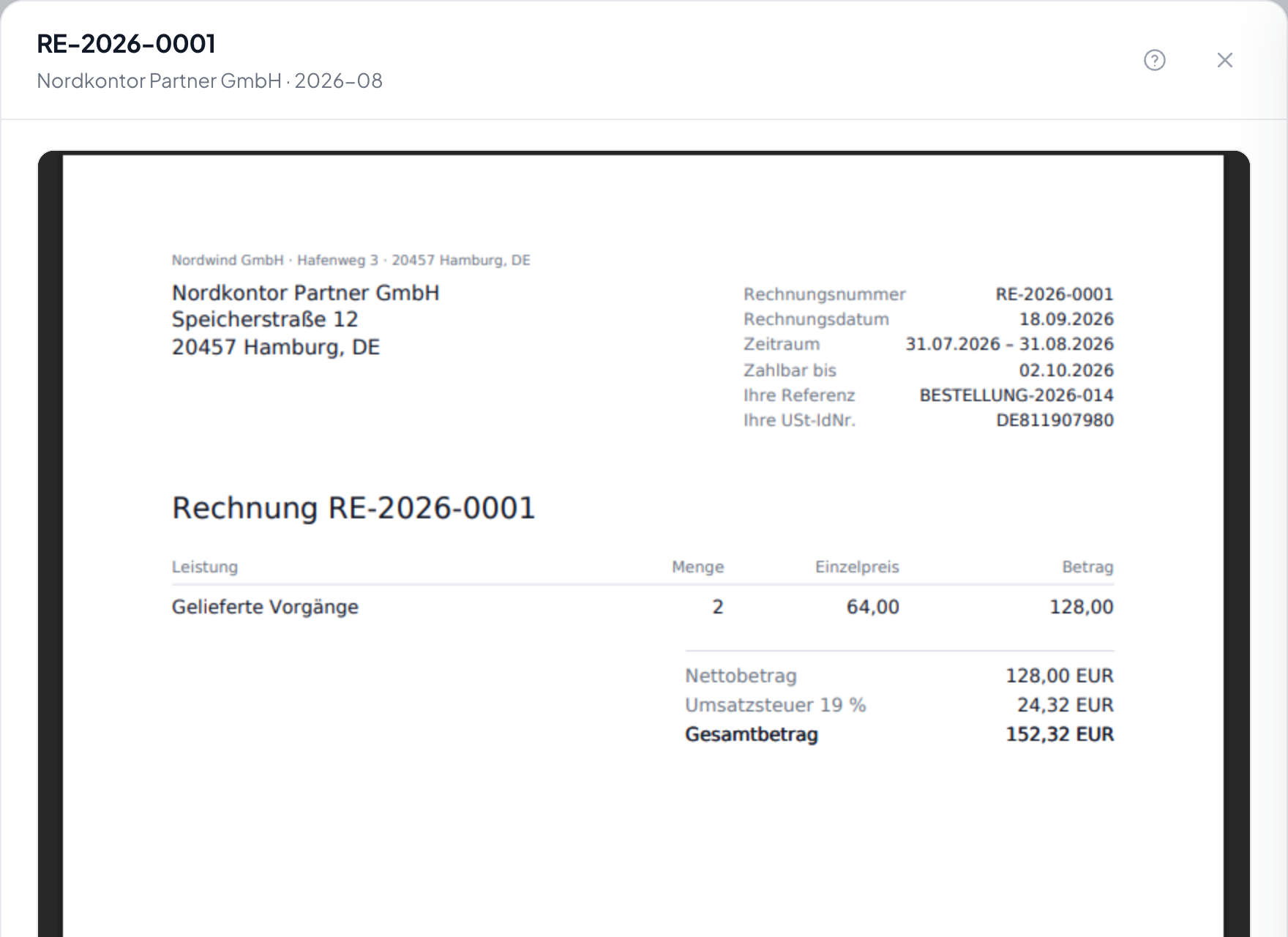
What an invoice contains

  • Your business details (legal name, address, VAT ID, tax office)
  • Partner business details (name, address, VAT ID if applicable)
  • Invoice number (sequential, gap-free)
  • Issue date and due date (based on partner's payment terms)
  • Period covered
  • Line items per assignment or per lead, depending on how detailed you set the line-item granularity
  • Subtotal, VAT (or reverse-charge notice), total due
  • Bank details and/or payment terms

Sending and tracking

Each finalized invoice can be:

  • Downloaded as a PDF for manual sending
  • Emailed to the partner directly from the UI (uses your account-level SMTP)
  • Made available to the partner via their Partner Portal

Payment status (Open, Paid, Overdue) is tracked manually for now. Mark invoices paid as you reconcile bank transfers.

Best practices

  • Use the Distribution Logs to spot-check counts before finalizing the first invoice each period.
  • Cross-reference revenue with Analytics to catch mismatches early.
  • Document your payment terms in your partner agreements before the first invoice goes out.
  • Don't finalize early. Once finalized, invoice numbers are locked. If a late cancellation comes in, you'll need to issue a credit note rather than edit the original.

Related articles

Was this helpful?
Thanks for your feedback!

Try Leadflip for free

Start capturing and managing leads in minutes.

Sign up free