Filter
1 min read · By Stefan Köhn
Lets the run continue only when a condition holds, and ends it otherwise. This narrows an automation down to the cases it was meant for, without building a second trigger for them.
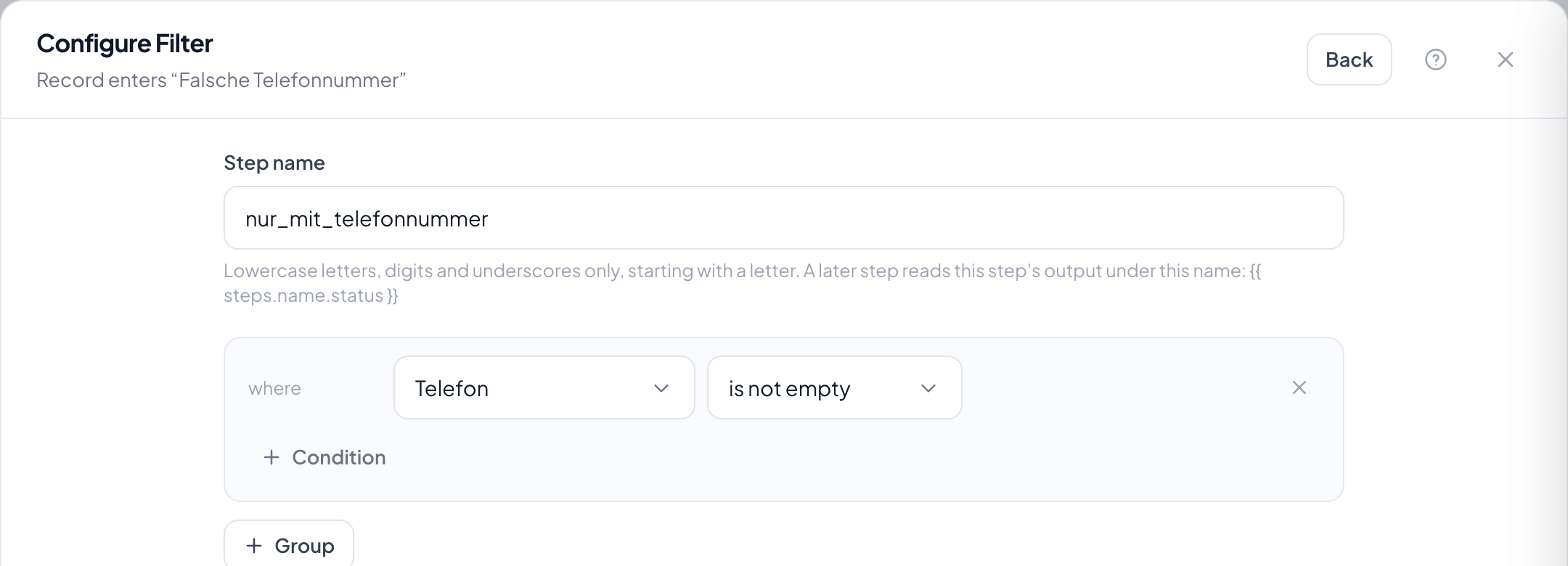
Step by step
- In the flow, click the plus where the check belongs and choose Filter.
- Assemble the condition: field, comparison, value. Several conditions can be grouped with AND and OR.
- Save with Save step.
- Switch the automation on and use the run inspector under Runs to see which records passed the filter and which did not.
What happens when the condition does not hold?
The run ends here and counts as finished, not as failed. It did what it was there for. The steps after it do not run.
How do I see which condition failed?
In the run inspector, on the step's output. It names the condition that actually failed and the value it found: for OR groups all of them, because there no single one is to blame.
When should I use a branch instead?
As soon as something should happen in the other case too. A filter knows only carry on or stop; a branch has named paths, and each carries its own steps.
Can I check for an empty field?
Yes, through the comparisons is empty and is not empty. That is the usual way to continue only once a detail has arrived.
Does the filter see the state now or at the trigger?
The state at the moment the step comes up. After a wait, the record may long since have changed: and that is usually the point.