Reformat text
1 min read · By Stefan Köhn
Reshapes a value before it is used further: strip spaces, fix capitalisation, reduce a number to digits, turn a date into the spelling that belongs in a letter.
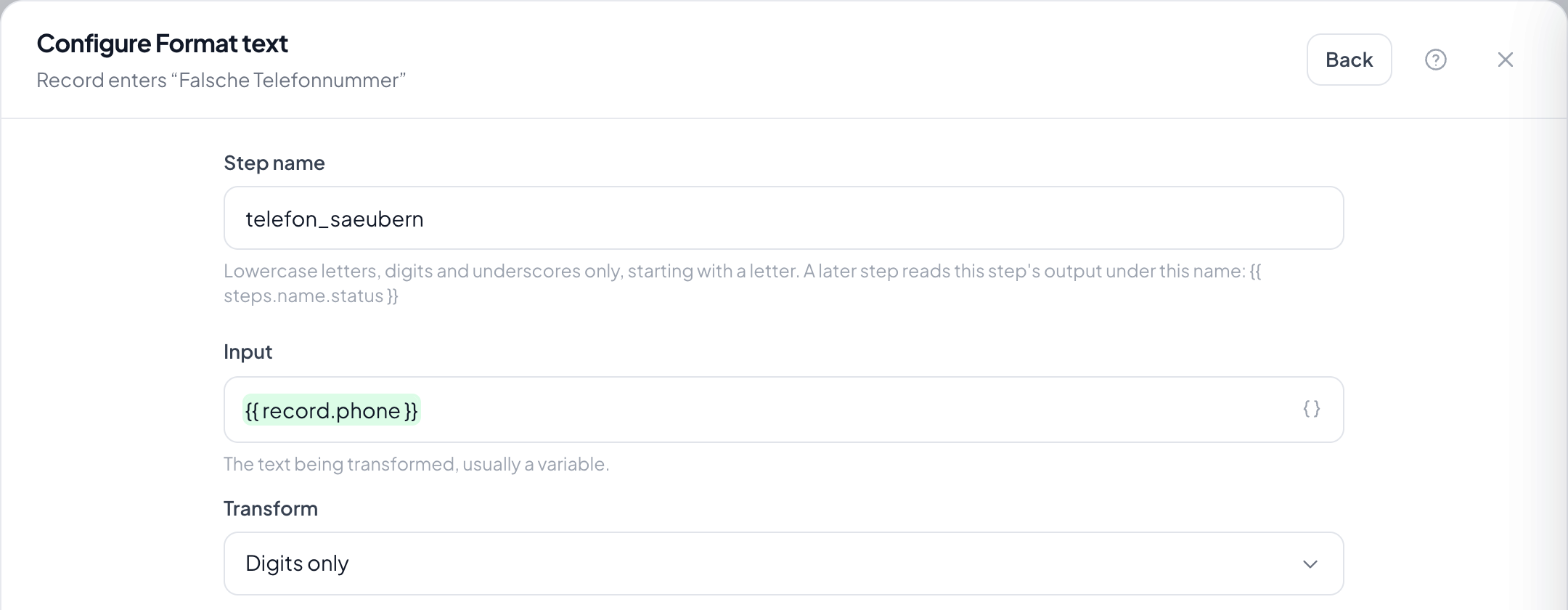
Step by step
- In the flow, choose the plus and take Reformat text.
- Under Input enter the source value: usually a variable from a field.
- Under Transform choose what should happen: trim, lower case, upper case, capitalise, digits only, search and replace, truncate or date.
- Fill in the extra setting when the transform needs one: search text, length or date format.
- Choose the target field, save, and check it on a real value.
What is this for?
For everything that arrives from a form. A line in capitals with a trailing space becomes the name that belongs in a salutation.
Can I chain several transforms?
Yes, with several steps. Each takes the result of the previous one as its input: first trim, then capitalise.
What happens when the input is empty?
The result is empty and the run carries on. The step is not a check; if you need one, put a filter before it.
How do I format a date for a letter?
With the date transform and the format you want, such as day.month.year. The result is text and belongs in a text field, not back in the date field.
Does the step change the source field?
Only if you choose the same field as the target. Otherwise the original value stays: which is usually what you want.