What you get told about
2 min read · By Stefan Köhn
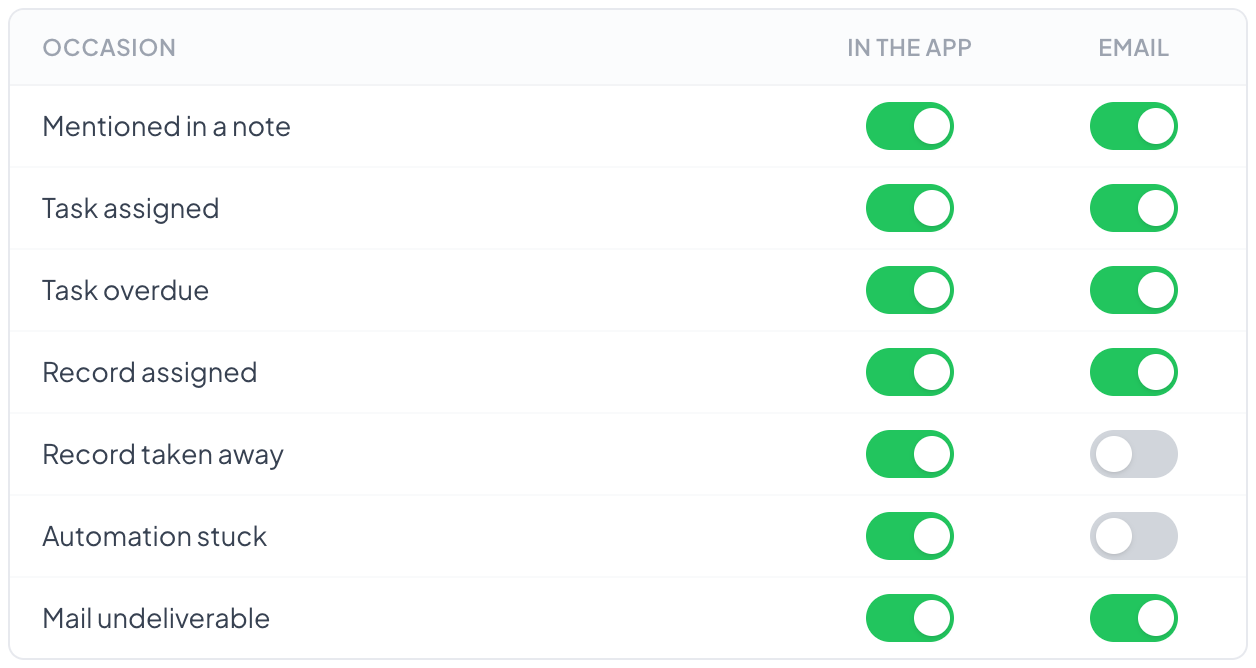
You decide per occasion whether you are told in the app or by email as well. The setting is yours and applies separately in each account you work in.
Eight occasions
Mentioned in a note, task assigned, task overdue, record assigned, assignment handed over, automation stuck, reply received, mail undeliverable. 'Reply received' tells you that somebody answered one of your emails: the reply sits on the record, and with three hundred records you will not spot it there on your own. It goes to whoever is responsible; if nobody is, it goes to nobody.
In the app or by email
In the app means: as a notice at the top while you are there. By email means: even when you are not. For anything needing an action, a task is the better tool; a notification is read and therefore done. Every email names the record it is about, in the subject and the text, and takes you there with Open record. In a summary, each item has its own link. The same holds for the email of the Notify automation step. A record in the trash sends no notifications, not even reminders for its tasks; restore it and they come back.
Nobody tells you what you did yourself
Anyone assigning themselves a record already knows. A notification about it would be noise and would devalue the rest.
Collecting when volume is high
Emails can be gathered instead of arriving one at a time. Notices in the app still appear at once; only the post is collected.
Step by step
- Open your profile, the Notifications tab.
- Decide per occasion: in the app, by email, both or neither.
- With high volume, switch on the digest for emails.
Does the setting apply in all accounts?
No, it belongs to the account. Anyone working in several sets it in each; in one you might be daily and in another once a month.
I get no emails.
First check whether the occasion is set to email, then your spam folder. Notifications go out through the account's sender, see Outgoing mail.
Why am I notified about a record that is not mine?
Most likely you are a watcher, because someone mentioned you or brought you in. See Who sees a record.
Does this need a right?
No. Your own settings hang off no role; anyone in the account keeps them. See Profile.