Access and portal rights
3 min read · By Stefan Köhn
Here you decide who from a partner's organisation may enter the portal, and what that organisation may change there. Those are two different questions: the role applies to a person, the right to the whole partner.
Two questions, not one
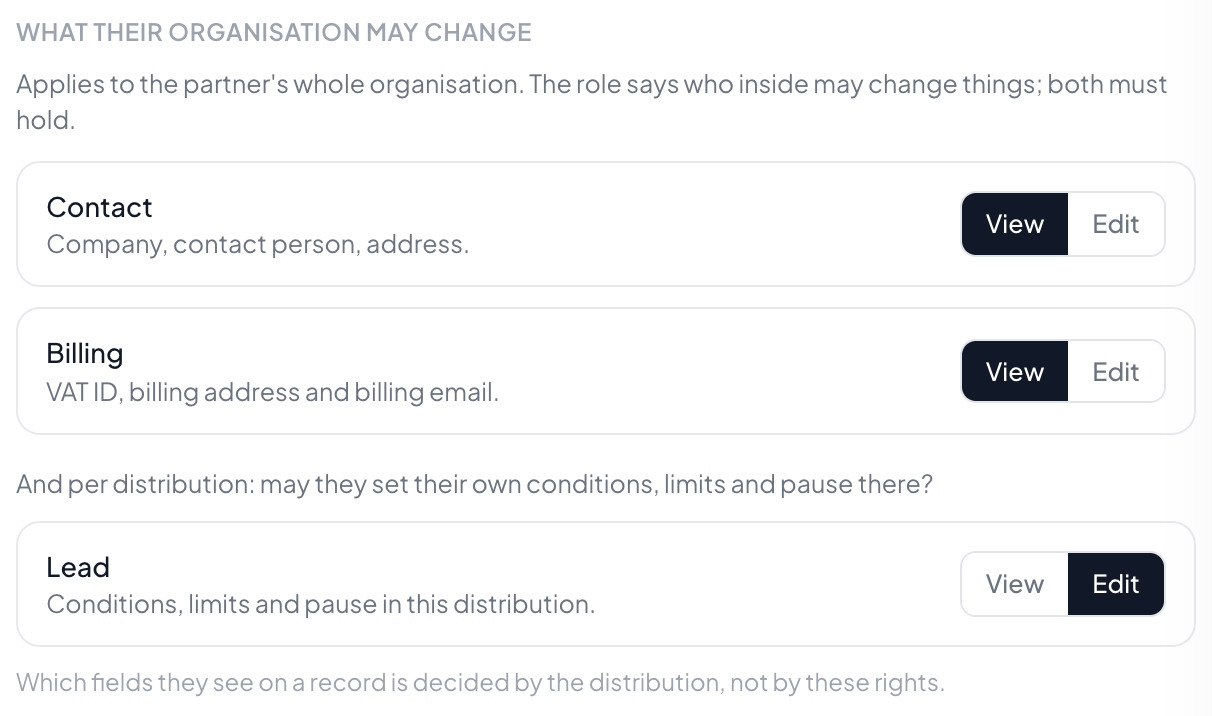
Who from a partner's firm may come in, and what that firm may change. The role applies to a person, the right to the whole partner. Two people from the same partner can therefore differ, but never exceed what the firm itself may do.
Invite rather than create
Enter the address, pick the role, invite. The person gets a mail with a link and sets their own password. A portal user is an ordinary user without account membership, not a second species.
Manage or read only
Read only means seeing without moving anything. Manage lets them change their own conditions and caps, if you allow it per distribution. What a partner can never change is prices, other people's records and anything outside their own firm.
The preview shows their view
It opens this partner's portal with their real data, read only and with a band across the top. The fastest way to answer a query is to see what the person asking sees.
Step by step
- Open Partners and go to the Portal tab.
- Decide first what this company may do: manage, or read only.
- Invite the people who may come in. Each of them gets their own sign-in.
- Look at the preview. It shows the portal the way the partner has it in front of them.
How do I invite someone?
Enter the email address, pick a role, invite. The person receives an email with a link and sets their own password: you never know it. If they already have an account with us, they only get the message that access was added.
What separates "manage" from "read only"?
"Manage" may return records, ask for goodwill and, as far as the partner's rights allow, change company details and filters. "Read only" sees everything and may report the working status of a record, nothing more. A return creates a credit note; that is not a reading action.
The partner has no access at all: do they still get anything?
Yes. The delivery email carries a signed link that lets them return the record without signing in. The portal is an offer, not a requirement.
What does "view" mean for the rights?
The area stays visible in the portal, the fields are locked, and below it a sentence says whom to contact. Hiding an area entirely would turn an answer into a search.
What can a partner never change?
Their price, the address deliveries go to, and their position in the distribution. The portal states this openly, so they do not go looking and mistake its absence for a fault.
What is the preview for?
It opens this partner's portal with their real data, read-only, with a banner across the top. When someone calls and says "I clicked on X", you are standing where they stand. You cannot trigger anything: a return that an administrator actually made would be a record that lies.