Notes on a record
5 min read · By Stefan Köhn
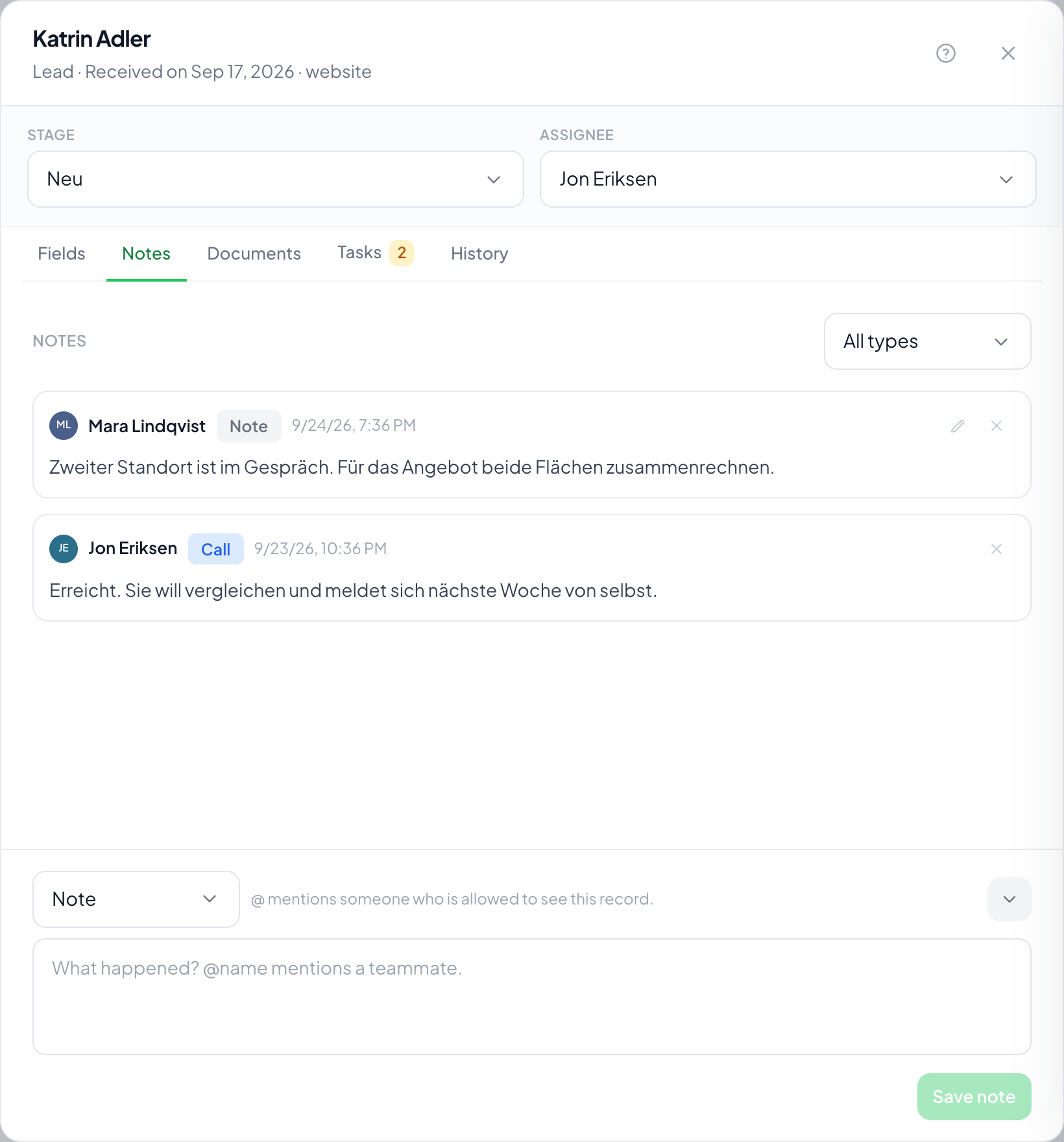
What does not fit into a field: the outcome of a phone call, a remark for a colleague, the sentence "wants to think it over". You write one through New note at the foot of the record, and read them in the Notes tab.
Three kinds, and why that is more than a colour
Note, Call and Email. The kind is a filter in the history and later a dimension to report on: how many calls does a closed deal take on average? In one pile that question cannot be asked.
Mentioning someone
With @ you mention a member of your team. They get a notification and become a watcher of the record, so they see it even without being responsible for it. You can only mention someone who would be allowed to see the record anyway. In the list, mentions carry a colour, and your own carries a different one from everybody else's: follow a notification into a record with twenty notes and you can see at a glance which one means you.
Incoming mail lands here too
When someone replies to a message that went out from a record, the reply appears as a note of the Email kind, marked as incoming. That way the whole correspondence sits in one place instead of in a mailbox alongside.
Sent mail shows up here too
Every email that leaves a record appears in the notes, marked as sent: written by hand, sent as a reply from the inbox or by an automation. You see the recipients, the subject, the written text and the names of the attachments, plus who wrote it. The header and the signature are not shown, and neither is a link carrying an access key, for example to sign or to pick a time. Sent emails cannot be edited or deleted. Older emails have no text because it was not stored back then.
Writing an email from the record
New email sits in the record footer next to New note, on every tab, as soon as there is an outgoing mail account: the account's or your own. Without either, the button is missing. The email unfolds in the footer like a note, and the record stays visible above it so you can look at the fields while writing. Collapsing keeps the draft, and a dot on the button shows it. Send with the button or ⌘/Ctrl+Enter. The email goes through your own access if you have one, otherwise through the account's with your name in front, and replies come back to you. The signature is always attached: your personal one, otherwise the account's. The recipient is always the address in the record's email field and cannot be changed here. To keep others informed, add them through Cc/Bcc. Attaching works as in the email automation: single documents of the record, a whole file field (then whatever is in it at sending goes along) or a file of your own through Upload file. What you upload lands in the record's documents and is selected right away. At most five attachments with 10 MB together. If one cannot be loaded, the email does not go out. Subject and text accept variables through the brace button, the same ones as in the email automation: fields of the record, account values, the assignee, form links. They are filled in when sending. If the account uses the reference in the subject, it is attached as with every email from the system, so the reply finds its way back to the record.
Step by step
- Open the record and click New note at the bottom. The field stays open while you move through fields and tabs, which is what it is for: writing along during a call.
- Pick the kind: Note, Call or Email.
- Write the text, and mention anyone who should see it with @.
- Save. The entry also appears in the history.
Can I edit a note later?
Yes, but only whoever wrote it. The pencil on the note opens it in the same field at the bottom that you wrote it in. The edited note is marked as edited afterwards. You can change its kind there too, for example when an email was filed as a plain note by mistake. An appointment note stays an appointment note.
Who may delete a note?
Whoever wrote it. Deleting someone else's note hangs on the manage right for notes, and only the administrator role carries it. Until 25 September 2026 the agent role carried it too, so anyone could remove any note. If your account wants it differently, tick it on the role, see Roles and rights.
Does the recipient see my notes?
No. Notes are internal. What goes out goes as a message, not as a note.
What happens to notes on export?
They come as a second file in the archive and are switched off by default. The reason is under Export: this is the unstructured part of the work and therefore the most delicate.
Why does a mentioned colleague get no notification?
Most likely they are not allowed to see the record. Mentioning assumes the access would exist anyway, see Roles and rights.
Why is the New email button missing?
Because neither the account nor you have set up an outgoing mail account, or because you lack the right to edit records. Mail written by hand does not go out through the system address.
Do I also see emails an automation sent?
Yes. They appear as sent in the notes and also in the history, with the automation as the sender.